Multi-Account CI/CD Platform
As the sole DevOps engineer on a five-person team, I replaced a fully manual deployment process and a publicly exposed load balancer with a production-grade CI/CD platform across two isolated AWS accounts. The same Docker image — built once, promoted by Git tag — deploys to dev and production with zero manual steps, no long-lived credentials, and a private API surface enforced through API Gateway.
Role: DevOps Engineer
Stack: AWS ECS Fargate · API Gateway (REST) · Terraform · GitHub Actions · ECR · VPC Link · Internal NLB
What Was Built
Designed and built a production-grade CI/CD platform that deploys a containerized FastAPI service across two isolated AWS accounts with zero manual steps. In a single sprint, the team went from ad-hoc Docker builds and a publicly exposed load balancer to a hardened, fully automated delivery pipeline — immutable image promotion from dev to prod, a private API surface, API key authentication, and built-in rate limiting.
The Challenge
I was the only DevOps engineer on a team of five. The deployment process had no automation: developers built Docker images locally, pushed them manually, and updated ECS task definitions by hand. There was no CI/CD pipeline, no environment parity between dev and production, and no isolation between AWS accounts. A bad push could take down the live API with no rollback path.
The API was also publicly accessible via a load balancer, had no authentication or rate limiting, and the application had its environment baked into source code — meaning the exact same container image could never safely run in dev without code changes.
Architecture
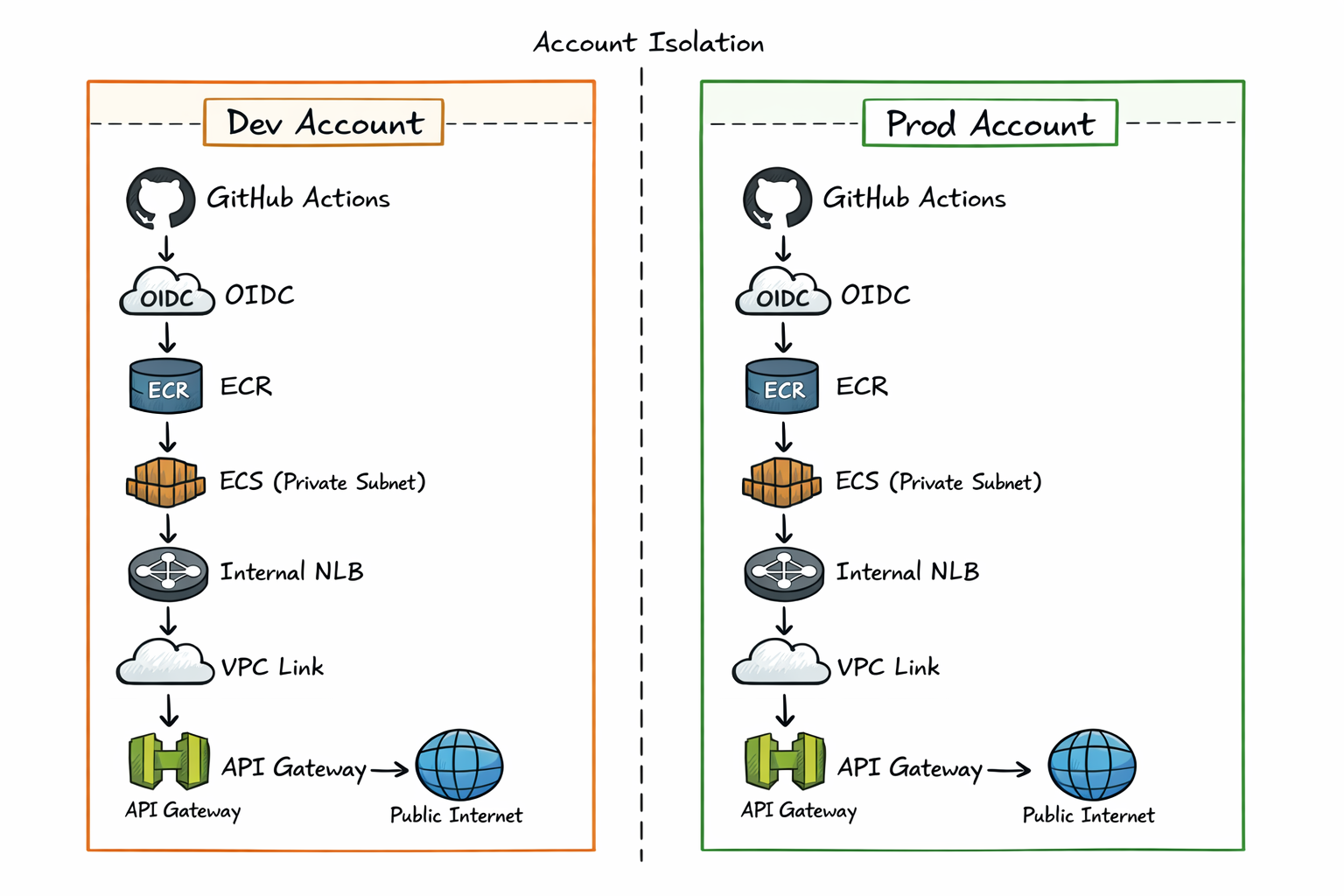
Two Isolated AWS Accounts
Dev and prod run in completely separate AWS accounts. Each has its own VPC, container registry, ECS cluster, and API Gateway deployment. They share no resources, so a broken dev deployment physically cannot affect production.
Each account has its own Terraform remote state backed by S3 with DynamoDB locking. Terraform uses partial backend configuration — the backend block is intentionally left empty in source, and the target bucket and state key are passed as flags at init time. This makes it structurally impossible to accidentally apply against the wrong account's state.
Private Networking
The original architecture had a public-facing load balancer. This was replaced with a private networking stack: ECS tasks run in private subnets with no public IP, an internal Network Load Balancer sits in front of the service, and API Gateway connects to the NLB via a VPC Link. The ECS service is unreachable from the public internet directly — all traffic enters through API Gateway.
Zero-Edit Merge Strategy
The core engineering challenge was making the same Docker image deployable to both accounts without any code changes. The solution was moving all environment-specific configuration out of the application into runtime injection.
The hardcoded environment value in server.py was replaced with an environment variable read at startup:
STAGE = os.getenv("API_STAGE", "").strip()
app = FastAPI(root_path=f"/{STAGE}" if STAGE else "")
The root_path parameter tells FastAPI where it's mounted — critical for API Gateway, which strips the stage prefix before forwarding requests to the backend. Without this, Swagger UI's openapi.json request resolves to the wrong path and returns a 403.
The /docs endpoint was also rewritten to use a relative URL:
@app.get("/docs", include_in_schema=False)
async def custom_swagger():
    return get_swagger_ui_html(openapi_url="openapi.json", title="API Docs")
No leading slash — the browser resolves it relative to the current path, so it works correctly under any stage prefix. Same image, zero edits, runs correctly in both environments.
GitHub Actions: Build Once, Promote Exact Image
The image is built once in dev and the exact artifact — same SHA, same bytes — is promoted to prod. It is never rebuilt for production. A push to the dev branch triggers a build, pushes the image tagged with the Git SHA, updates the ECS task definition, waits for the service to stabilize, and runs a smoke test against the health endpoint. A tagged release triggers the same flow against the prod account, using the image already validated in dev.
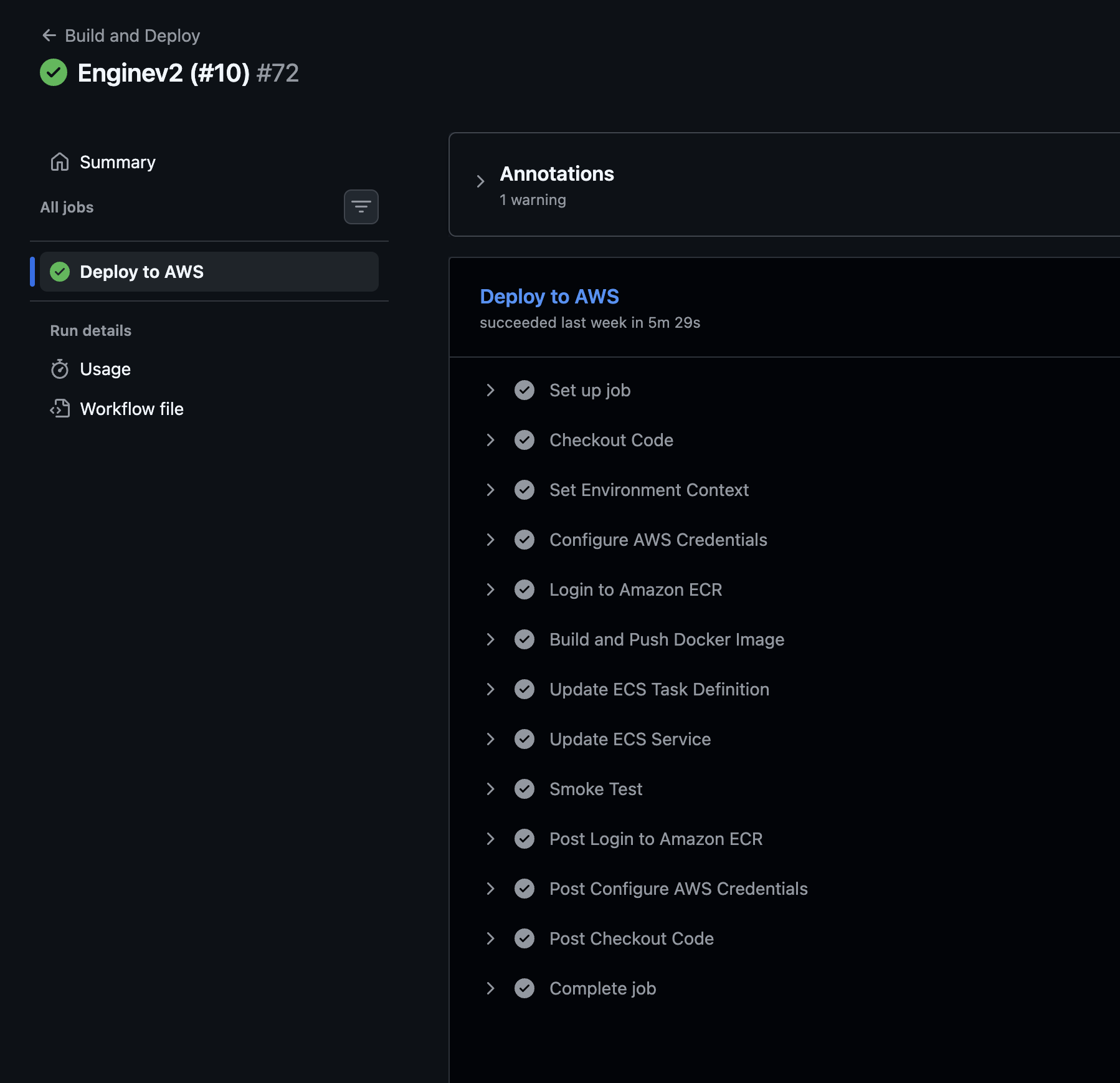
A real problem during setup: Every job was stuck on "Waiting for a runner" indefinitely. The root cause was the environment: keyword in the workflow YAML — GitHub Environments with deployment protection rules require a paid plan for private repositories. On the free tier, every job silently queues forever and never starts. The fix: removed the environment: keyword and stored secrets at the repository level, namespaced by environment prefix. A conditional in the workflow selects the correct set based on the ref.
A subtle bug also caught during setup: A find-and-replace when preparing the production workflow accidentally renamed the shell redirect path /dev/null to /prod/null. The smoke test failed silently. Fixed by restoring the correct system path — an easy mistake to make and a good reminder to treat system paths as literals, not strings.
OIDC Authentication
Each AWS account has its own OIDC provider and an IAM role that GitHub Actions assumes via web identity federation — no long-lived access keys stored anywhere. The trust policies are deliberately asymmetric: the dev account trusts deployments from the development branch, while the prod account is locked to tagged releases only. This creates a natural release gate — you cannot deploy to production without an explicit version tag. IAM permissions granted to the role are scoped to the minimum needed: image registry operations, task definition registration, service updates, and role passthrough.
API Gateway: Authentication and Rate Limiting
Routes are split between public and protected. Health and documentation endpoints are accessible without credentials. All API routes require a valid API key, with usage plans enforcing per-day and per-second rate limits. CloudWatch captures both access and execution logs per stage.
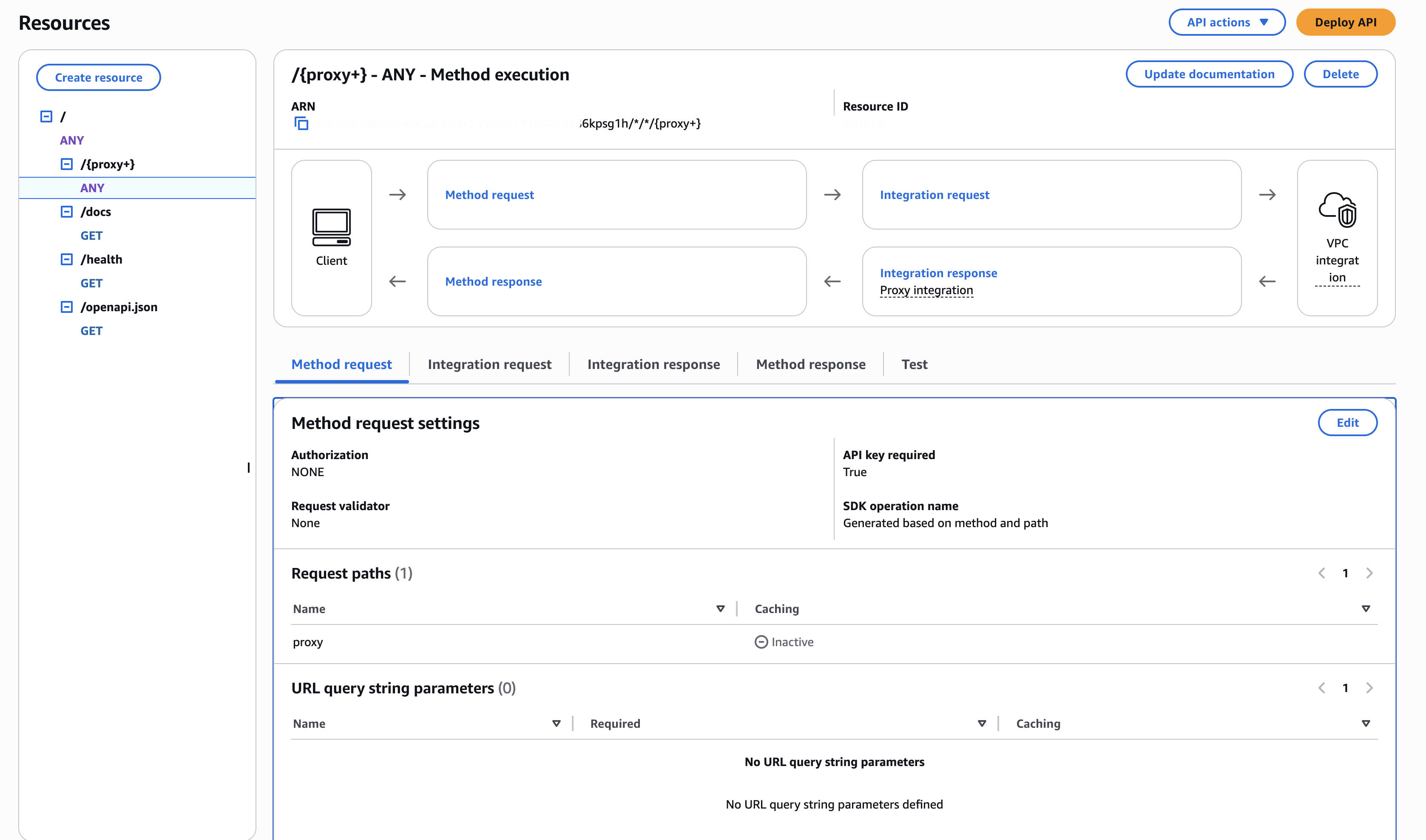
One common Terraform gotcha here: the API Gateway deployment resource only redeploys when its own configuration changes — not when dependent routes or integrations change. Any new route added through Terraform won't go live until a deployment is triggered. The fix is a triggers block that computes a hash across all route resource IDs:
triggers = {
  redeployment = sha1(jsonencode([
    aws_api_gateway_resource.root.id,
    # ... all route IDs
  ]))
}
Any route change forces a redeployment. Without this, stale deployment snapshots persist and newly added routes silently return 403s.
Results
- Zero manual deployment steps. Dev branch pushes trigger a full build, ECS rollout, and smoke test. Production deploys on a tagged release.
- Environment isolation. Dev and prod are in separate AWS accounts. A broken dev deploy cannot touch production.
- Immutable artifacts. Every image is tagged with the Git SHA. Rollback is a one-line change. No
latesttag in production.
- Private API surface. The ECS service is unreachable except through API Gateway. All external access is authenticated and rate-limited.
- Stable release cadence. The team moved from fully manual, undisciplined deployments to a predictable bi-weekly release cycle — with confidence in every deploy.
- Swagger UI works in production. FastAPI's
/docsendpoint correctly resolves under the API Gateway stage prefix — a commonly broken edge case that was diagnosed and fixed.
Related reading: How I Debugged API Gateway 403s in Production · The Zero-Edit Merge Strategy Explained